Some thoughts make more sense out loud.
Voice journaling means keeping a journal by speaking instead of writing. You can record a voice note, dictate an entry, or talk it through in a conversation. Hoglet is a conversational voice journal for iPhone: it listens and responds as you speak, then saves a reflection you can return to.
Start with a half-formed thought, a question you keep circling, or something you cannot quite explain. Having something to respond to can bring out the next part of the thought—and the part after that.
How is conversational voice journaling different?
Some thoughts are easier to work out in conversation than alone. Hoglet listens and can respond while you speak, helping you follow the thought instead of simply recording it.
| Format | What you do | When it helps | What you keep |
|---|---|---|---|
| Written journaling | Write, arrange, and revise the entry yourself. | You want quiet, a slower pace, or control over the exact wording. | An entry in your own words. |
| Voice note or dictation | Speak while the tool records or turns your words into text. | You want to capture something quickly without typing. | An audio recording or transcript. |
| Conversation with Hoglet | Talk it through with Hoglet. It listens and can respond as you speak. | A relevant response helps you explore the thought further. | A dated reflection with a summary, findings, supporting evidence, and the source session. |
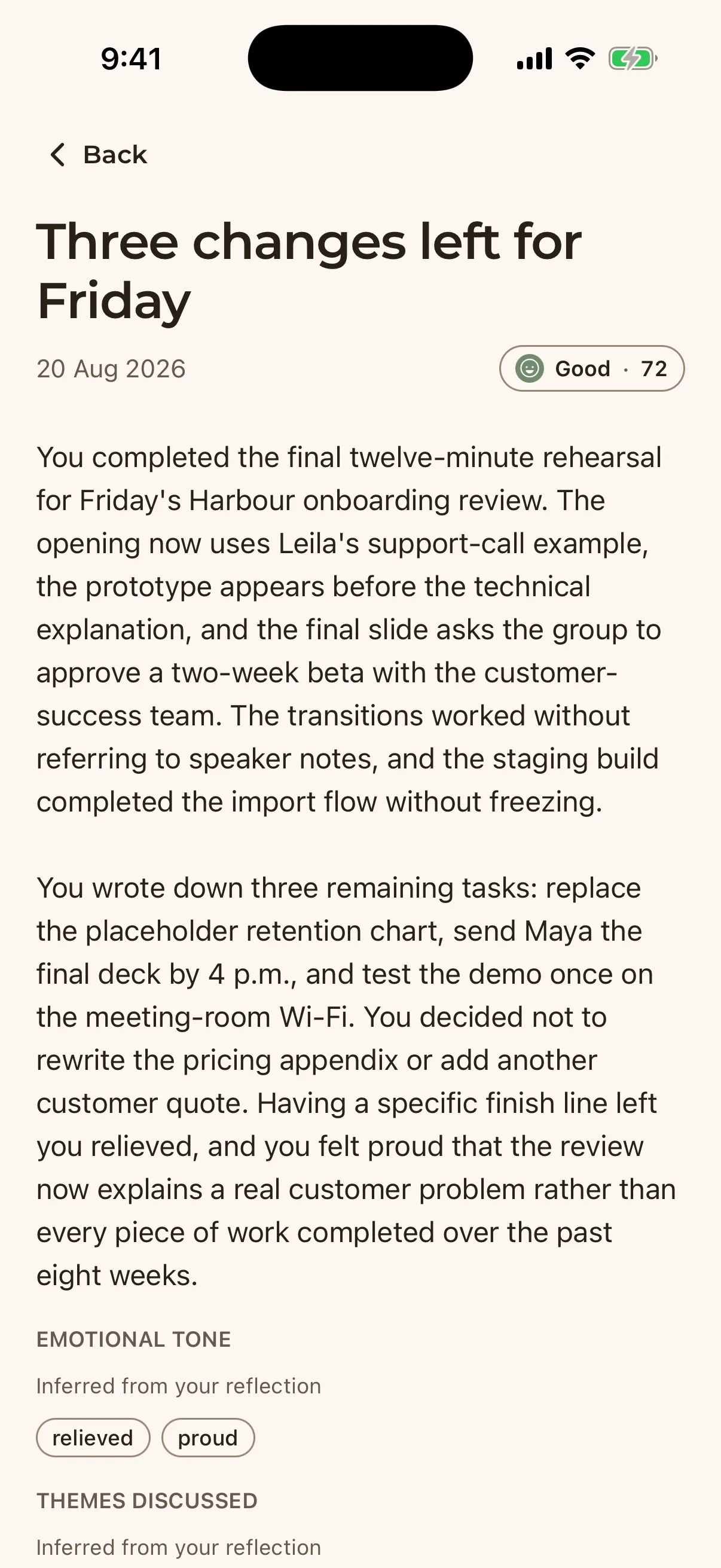
The conversation becomes a reflection.
When you finish, Hoglet turns the conversation into a dated reflection with a summary, mood, emotional tones, themes, and supporting excerpts. You can see what it picked up and where each finding came from.
See what Hoglet keeps after a reflection